

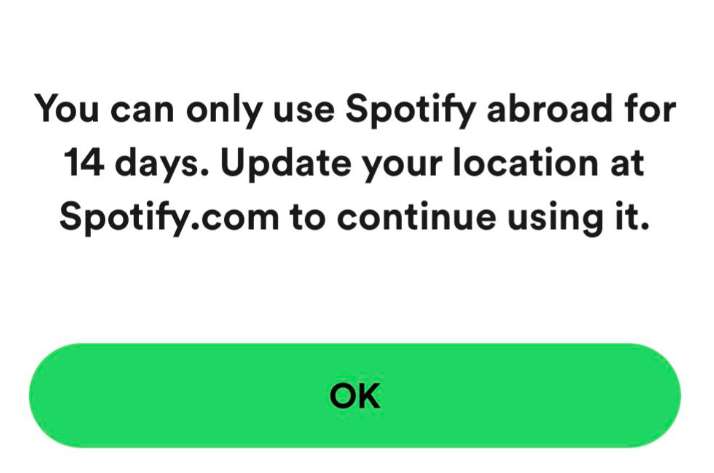
This error pops up when Spotify detects you’re logging in from a different country than your account’s registered location, limiting “abroad” use to 14 days to prevent account sharing or fraud. It’s common for travelers or VPN users. Premium accounts don’t have this limitation, but if you’re on the free tier, here’s how to fix it.
Ways to Troubleshoot Spotify 14-day Abroad Warning on Free Accounts
Verify Account Country Settings through the Web
Spotify restricts free accounts to 14 days abroad unless the country setting matches your location.
- Go to spotify.com/account/overview
- Log in to your Spotify account
- Check the Country/Region field
- If incorrect, update it to your current country
Update your Payment Information
Premium accounts require valid payment details from your current country.
- Go to spotify.com/account/payment
- Add a payment method from your current country (e.g., local credit card)
- Save changes and retry login
Reinstall the Spotify App on your Device
Cached data may prevent updated settings from syncing.
- Log out of Spotify on all devices
- Uninstall and reinstall the app
- Log back in with updated account details
Use Premium Subscription to Bring Spotify Everywhere
Free accounts are limited abroad, while Premium removes the 14-day restriction.
- Upgrade to Premium if you travel or relocate often
- Ensure subscription is active and linked to your current country
Contact Spotify Support
Lastly, if the same issue still persists, the official Spotify support team can manually adjust your account.
- Visit support.spotify.com
- Provide details of your move and payment method
- Request assistance to reset or update your account
Travel Checklist for Spotify Users
Here’s a practical and quick travel checklist to help you avoid Spotify’s “Login Failed: You can only use Spotify abroad for 14 days” error when you’re out of the country:
- Download playlists offline before leaving your home country.
- Switch to Premium if you’ll be abroad longer than 2 weeks.
- Update your account country immediately after relocating.
- Keep billing info current to avoid mismatches.
- Log in via web browser if the app blocks you.
This way, you’ll stay connected to your music whether you’re on a short trip or moving abroad.